
Browse by feature or screen
Browse by screen
Choose an area of the screen
Select a numbered marker in the image to jump to the buttons and panels in that area.
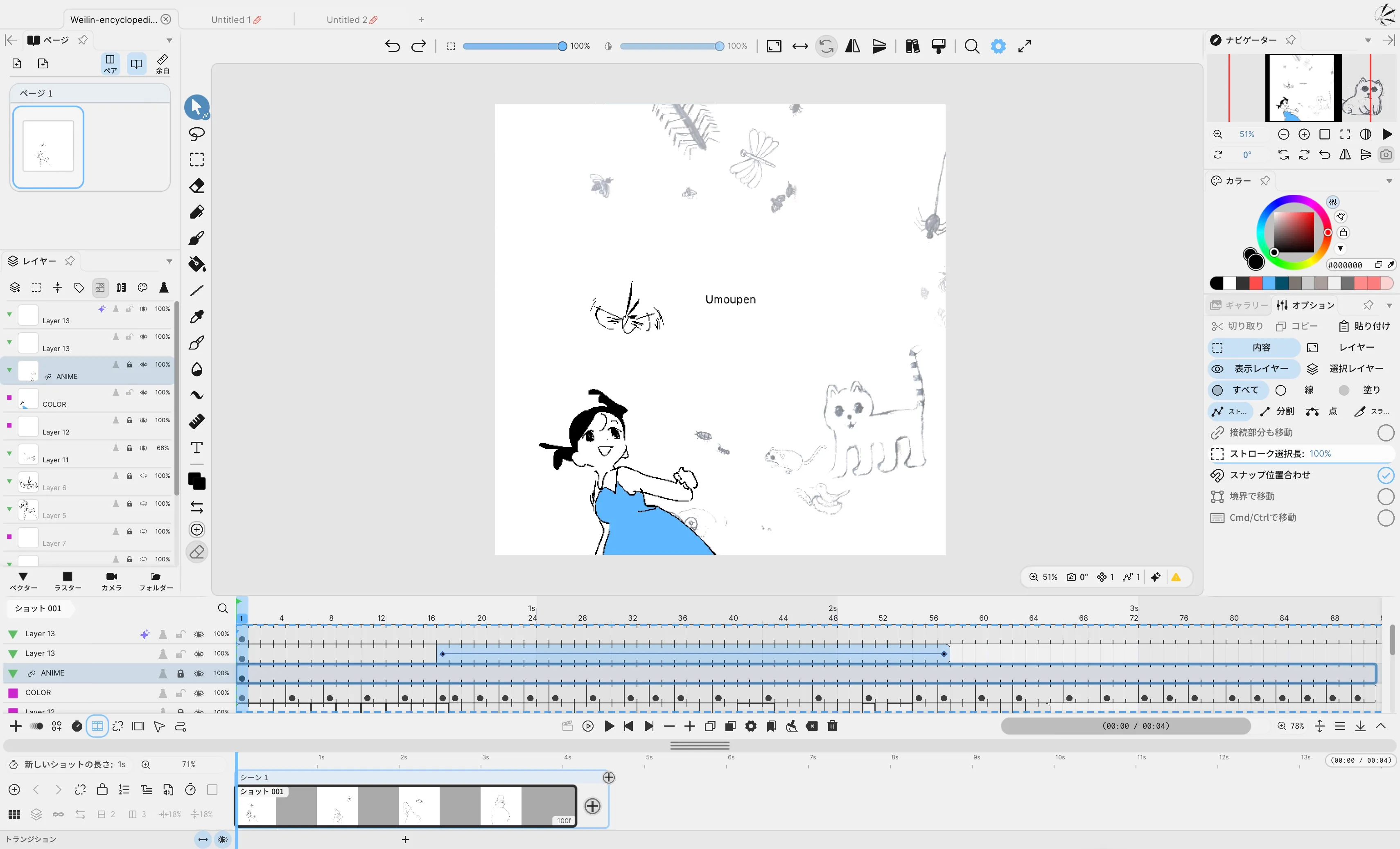
- Project tabsProject names, unsaved indicators, close buttons, and the + button
- Playback and frame controlsFrame navigation, playback, add, duplicate, and delete controls
- Top-center toolbarView controls, panels, search, and settings
- Pages and Layers panelsPages, layers, and add buttons
- 2D toolsTools in the vertical column on the left
- StageCanvas and visible area in the center
- Panels on the rightNavigator, Options, Color, and Gallery
Panels can be moved. If your layout looks different, use the same panel name to find the relevant article.
What you can find there
Choose a visible label or the action you want to perform.
Project tabs
Project names, unsaved indicators, close buttons, and the + button
Playback and frame controls
Frame navigation, playback, add, duplicate, and delete controls
- Move to the previous or next frameGo to the previous or next frame
- Playback, looping, and playback rangePlay button and range start and end points
- Add a blank frame or duplicate a frameThe difference between adding and duplicating
- Clear, remove, or delete framesHow these similar deletion actions differ
- Change a cell’s exposure lengthShorten or extend it
- Understand the timelineCells, playback position, and layer rows
Top-center toolbar
View controls, panels, search, and settings
- Zoom, rotate, or flip the viewActual size, fit to width, and reset rotation
- Show or hide panelsPanel button and the show/hide-all control
- SearchFind commands and features with the magnifying glass
- Open settingsFile, export, view, and panel settings
- Customize toolbar buttonsShow, hide, and reorder buttons
- Fit the storyboard to the screenFit it to the shot grid
Pages and Layers panels
Pages, layers, and add buttons
- Pages panelPage thumbnails and view switching
- Layers panelTop-row icons and the active layer
- Add a raster or vector layerAdd buttons and layer types at the bottom
- Show, lock, or solo a layerChange the state of a layer row
- Folders and parentingOrganize layers into groups
- Camera layerCamera add button at the bottom
2D tools
Tools in the vertical column on the left
Stage
Canvas and visible area in the center
Panels on the right
Navigator, Options, Color, and Gallery
- NavigatorChoose the visible area, zoom level, and view
- Options / PropertiesControls change with the selected tool
- ColorColor wheel, HSV / RGB, and recent colors
- GalleryFind, place, and save assets
- Show and arrange panelsOpen, dock, float, or lock a panel in place
- Find other panels by nameList of 23 panels in build 530
Use the screen map above to move from a location in the interface, to the buttons or panels you see there, and then to the matching feature articles. The list below finds published feature articles by English UI label, command name, and registered search term.
Browse by feature or command name
Section titled “Browse by feature or command name”Setup, settings, and workspace
Section titled “Setup, settings, and workspace”| ID | Feature article | Screen and search terms |
|---|---|---|
| WRK-001 | Show and arrange panels | Panel, Panels, Show Panels, Frame Picker, Separate Timeline Window, Lock Panels, Use Single Workspace for All Files |
| WRK-002 | Read and customize toolbars | 2D Tools, Top Center Toolbar, Timeline Bottom Toolbar, Panel Tool, Customize Toolbar, Outer Edge, Layout |
| WRK-003 | Search | Search |
| WRK-004 | Reading the Settings menu | Settings, gear, File, Export, View, Layout, More, My Library |
| WRK-005 | Adjust the display | View, Hi-DPI, Tooltips, UI Animation, HUD, Pixel Preview, Binarize, Pixel Art Mode |
| WRK-006 | Configure pen input | Use Raw Pen Input, Pen Input, Pen Pressure, Stabilizer Catch-Up, Hide cursor while drawing, Draw with Finger, stabilizer catch-up, Pen Eraser: Current Tool |
| WRK-007 | Shortcuts and keybind presets | Edit Keybinds, Shortcuts, Keybind Presets, hotkeys, Decrease Brush Opacity, Increase Brush Opacity, Decrease Brush Flow, Increase Brush Flow |
| WRK-008 | Undo, Redo, and action history | Undo, Redo, Undo History |
| WRK-009 | Help and Tips | Help, Tips, Shortcuts |
| WRK-010 | Use scripts | Scripts, New Script, Edit Script |
| WRK-011 | Sessions and collaboration | Session, Online Sessions, Ownership |
| WRK-012 | Update Umoupen | Check for Updates, Auto Update |
| WRK-013 | License activation and device management | Enter License Key, My Devices, About Umoupen, Recover License, Request Refund, Gift key email, Email verification code |
| WRK-014 | Report a bug | Report a Bug, Send Report, Bug Reports, Open in Discord, Add Screenshot, Include this file, Diagnostic Logging, Diagnostic Recording |
| WRK-015 | Install Umoupen | Install, Download, macOS ARM, Intel Mac, Windows MSIX, Portable EXE |
| WRK-016 | Workspace presets | Workspace Presets, New Workspace, Load workspace preset, Save current panel layout to this workspace, workspace presets |
| WRK-017 | Moving from Adobe Animate | Adobe Animate, Animate, Flash, Graphic symbol, Movie Clip, Convert to Symbol, Flash / Animate, moving from adobe animate |
Projects and files
Section titled “Projects and files”| ID | Feature article | Screen and search terms |
|---|---|---|
| PRJ-001 | Project types and creating a new file | New File, Project Mode, Document Size, Default Stage Size, shot stage size, Use Cameras |
| PRJ-002 | Open and close files | Open File, Close File, Previous Tab, Next Tab |
| PRJ-003 | Save a project | Save, Save All, drawings could not be written |
| PRJ-004 | Save As and templates | Save As, Save as Template |
| PRJ-005 | Auto Save, recovery, and snapshots | Auto Save, File Snapshots, Revert File, crash recovery |
| PRJ-006 | Splash Screen and project management | Splash Screen, Open Splash Screen, Create New File, Recent Files, Reopen Files, Reset Default Folder, Remove from Recent Files, Open in New Tab |
Drawing and editing
Section titled “Drawing and editing”| ID | Feature article | Screen and search terms |
|---|---|---|
| DRW-001 | Raster and vector layers | Raster Layer, Vector Layer |
| DRW-002 | Draw with the Brush | Brush, Properties, Size, Dynamics, Dual Brush, Pick Up Color, Carry, Deposit |
| DRW-003 | Draw with the Pen | Pen, Properties, Custom Pen Tip, Follow Direction |
| DRW-004 | Erase artwork | Eraser, Properties, Erase Area, Auto Split Strokes |
| DRW-005 | Fill an area with color | Fill, Properties, Fill Gap, Tolerance, Draw Fill Shape, Gradient Fill, Linked, Fill references |
| DRW-006 | Draw shapes | Shape, Properties, Line Width, Round Caps, Quadratic, Cubic, Quadratic Bezier, Cubic Bezier |
| DRW-007 | Add text | Text, Properties, Font, Furigana, Speech Bubble, Add to favourite fonts |
| DRW-008 | Sample colors with the Eyedropper | Eyedropper, Properties, Primary Color, Loupe |
| DRW-009 | Blend | Blend, Properties, Blend Tool Mode, Curve Area |
| DRW-010 | Move and transform artwork | Move, Properties, Scaling Filter, Snap Alignment, Repeat Transform, apply / repeat transform, Enter, Integer Scaling |
| DRW-011 | Select with Lasso or Rect Select | Lasso, Rect Select, Properties, Polygon, Ellipse, selection tools polygon ellipse, Show transform handles |
| DRW-012 | Select an area with Auto Select | Auto Select, Wand, magic wand, auto select tool, Tolerance |
| DRW-013 | Edit a selection | Edit, Selections, Select Opaque Pixels, Paste Raster, Paste Text, Paste Symbol, Paste Vectors, Expand Selection |
| DRW-014 | Warp and distort a selection | Warp, Distort |
| DRW-015 | Align, distribute, and arrange | Align Left / Right / Top / Bottom, Distribute |
| DRW-016 | Edit vector strokes and fills | Curve Area, Vector Stroke, Vector Fill, Replace Color, current frame, layer, shot, file |
| DRW-017 | Rulers and drawing guides | Ruler, Properties, Ray Density, Golden, Ruler Snap, Save to Layer, Save to Folder |
| DRW-018 | Stroke and fill colors | Color, Palette, Hex Color, hex color code, Copy Hex, Eyedropper, Color Tip, Color Pair |
| DRW-019 | Smart Fill Layer | Smart Fill Layer, New Smart Fill Layer, color seeds |
| DRW-020 | Liquify tool | Liquify, Liquify Tool, local deformation |
Layers, symbols, and effects
Section titled “Layers, symbols, and effects”| ID | Feature article | Screen and search terms |
|---|---|---|
| LAY-001 | The Layers panel and active layer | Layers, Active Layer, Select, Slim, Label, Opacity, Draft, Tint |
| LAY-002 | Create a layer and choose its type | New Layer, New Raster Layer, New Vector Layer, new layer type, add layer |
| LAY-003 | Organize layers | Rename, Duplicate Layer, Move to New Folder, Resize Layer, Delete Layer, Duplicate Blank Layer |
| LAY-004 | Visibility, locking, and Solo | Visible, Locked, Solo, Soft Solo, soloOthersOpacity, Opacity of other visible layers while Solo is enabled, Draft Layer, Lock Transparency |
| LAY-005 | Opacity, blend mode, and tint | Opacity, Adjust Layer Opacity, inline opacity slider, Blend, Blend Mode, hover preview, Tint, Label Color |
| LAY-006 | Folders and parenting | Folder, Move to New Folder, Sync Layer Timing |
| LAY-007 | Masks and clipping masks | Clip to Layer Below, Clipping Mask, Use as Clipping Mask, Release Clipping, clipping mask, clipping group |
| LAY-008 | Merge, flatten, and rasterize layers | Merge Layers, Merge Down, Merge Selected Layers Or Merge Down, Flatten Layers, Convert Layer to Raster |
| LAY-009 | Create and reuse symbols | Convert Selection to Symbol, Convert Layer to Symbol, Create Symbol, Add Symbol, what is a symbol |
| LAY-010 | Symbol instances and Edit in Place | Edit in Place, Show in Gallery, Symbol Playback |
| LAY-011 | Layer effects | Effects, Bake Effects, Add Layer Effect, Toggle Layer Effect, celFrame, shader uniforms, Save Current Effect Preset, Delete Effect Preset |
| LAY-012 | Custom effects | Edit Effect, Effect Source, Effect Parameter, Parameter Array, float array, vec4 array |
| LAY-013 | Transform parent | Transform Parent, No Parent, Follows, layer parenting |
Animation and timing
Section titled “Animation and timing”| ID | Feature article | Screen and search terms |
|---|---|---|
| ANI-001 | Reading the Timeline | Timeline, Timeline Bottom Toolbar, Show Timeline, Separate Timeline Window, external timeline, detached timeline, F9, dope sheet |
| ANI-002 | Frames, drawings, cels, and exposures | Frame, Drawing, Cel, Cell, Exposure |
| ANI-003 | Move through time | Previous Frame, Next Frame, Step, Scrub, Go to First Frame, Go to Last Frame, Page Up, Page Down |
| ANI-004 | Blank and duplicate frames | New Blank Frame, Add Frame, Duplicate Frame, Fixed New Frame Length, Legacy Insertion Mode |
| ANI-005 | Split, clear, remove, and delete frames | Split Frame, Clear Frame, Remove Frame, Delete Frames |
| ANI-006 | Change exposure length and position | Shorten Frame, Extend Frame, Move Frame |
| ANI-007 | Playback, looping, and playback range | Play Animation, Play From Start, Play Through, Bounce |
| ANI-008 | Onion Skin | Onion Skin, Peg Field, out-of-pegs, Show Marked Frames Only, Drag to change onion skins before, Drag to change onion skins after, inline scrub bar indicator, light table |
| ANI-009 | Frame marks and groups | Mark Frame, mark key, K key, Edit Mark Groups, In-between, In-betweens, inbetween marks, exposure marks |
| ANI-010 | Multi-Frame Edit | Multi-Frame Edit, Multi-Frame Offset Mode |
| ANI-011 | Timeline thumbnails, Frame Roller, and range linking | Thumbnail View, Frame Roller, Toggle Thumbnail, link animation range to content |
| ANI-012 | Animate symbols, text, and layers with Tween | Tween, Keyframe Editor, keyframe timing, Add Tween Keyframe, Convert Tween to Keyframes, Cut Tween Points, Paste Tween Points, Tween Keys Cut |
| ANI-013 | Curve Editor | Curve Editor, Edit Tween Curve, value graph, speed graph, easing, Reset Handles, Smooth Handles, Linear Segment |
| ANI-014 | Sync layer timing in a folder | Sync Layer Timing, Folders and timing |
| ANI-015 | Read and use the Timesheet Timeline | Timesheet, Frame Notes, Note Categories, Add note, Mark note done, Reopen note, Search notes, x-sheet |
Storyboards, pages, and books
Section titled “Storyboards, pages, and books”| ID | Feature article | Screen and search terms |
|---|---|---|
| STB-001 | Understanding the Storyboard Timeline | Shot, Cut, Storyboard Timeline, Play All Shots |
| STB-002 | Add, delete, and split shots | Add Shot, Delete Shot, Split Cut |
| STB-003 | Shot length and playback range | Edit Shot Length, Shot Length Lock, Lock shot In / Out, lock in and out |
| STB-004 | Reorder shots and group them into sequences | Shot Sequence, Shot Grid Order, Color Shot, Clear Shot Color, Export Sequence as Umou File |
| STB-005 | Captions and categories | Edit Shot Caption, Edit Caption Categories |
| STB-006 | Add audio to a storyboard | Add Audio Track, Import Audio, Add Shot Audio, Edit Shot Audio, BGM, MV, audio across shots, music track |
| STB-007 | Storyboard panel and shot thumbnails | Storyboard, Shot Thumbnail Grid, CAM, Show Camera Path |
| STB-008 | Play a storyboard | Storyboard and Playback, Previous / Next Shot, Start Shot Timing, Mark Shot End and Advance, Finish Shot Timing, Play All Shots, Play Shot |
| STB-009 | Storyboard scripts | New Storyboard Script, Import Storyboard Scripts |
| STB-010 | Pages panel and page switching | Pages, Make Single Page, Make Double-Page Spread, bookPanelSheetView, showMargins |
| STB-011 | Add, duplicate, delete, and reorder pages | Cut Page, Copy Page, Paste Page, Insert Page Before / After, Reorder Pages |
| STB-012 | Double-page spreads, solo pages, and page margins | Double-Page Spread, Solo Page, Edit Page Margins, Book Margins |
| STB-013 | Page animation and playback | Page Edit Mode, Pages and Playback |
| STB-014 | Transitions between shots | Add Transition, Delete Transition, Transitions, Transition type, Wipe shape, Transition padding, Pad new transitions, Preview transition |
| STB-015 | Group shots into scenes | Add Scene, New Scene, Group into Scene, Ungroup Scene, Split Scene, Rename Scene, Delete Scene, Hide Scene |
Stage, camera, and 3D
Section titled “Stage, camera, and 3D”| ID | Feature article | Screen and search terms |
|---|---|---|
| STG-001 | Pan, zoom, and rotate the Stage | Actual Size, Fit Width, Reset Rotation, Flip Horizontal, Flip Vertical, hand tool, space bar hand tool, pan the canvas |
| STG-002 | Navigator | Navigator, Select View, Pages, Cameras, Sync with Editor |
| STG-003 | Grid, Snap, and Orthographic view | Grid, Ruler Snap, Orthographic |
| STG-004 | Viewports | Viewport, Edit Viewports, Set Viewport |
| STG-005 | Show the Pasteboard | Pasteboard, Effective Area Outline |
| STG-006 | Camera Layer | Camera, New Camera Layer, Set Camera, Convert Selected Symbol to Camera |
| STG-007 | Camera lock, paths, and motion paths | Camera Lock, Camera Path, Motion Path |
| STG-008 | Camera Folder | Camera Folder, Add Camera Folder, Use Camera View, Show Contents Raw |
| STG-009 | Zones and export zones | Zone, zone tool, Show Zones Outside Tool, Export Zone, Export All Zones, Endless, Hypercanvas, infinite canvas |
| STG-014 | Multiplane and depth | Multiplane Parallax, Scale to Depth, Edit Depths, multiplane camera, parallax, camera dolly |
| STG-015 | Camera shake | Shake settings, Shake X, Shake Y, Roll, Alternate, camera shake |
Assets and media
Section titled “Assets and media”| ID | Feature article | Screen and search terms |
|---|---|---|
| MED-001 | Use the Gallery | Gallery, Convert Selection to Symbol, Convert to Native, Mark as Actor, Claim Ownership, Global Gallery |
| MED-002 | Organize the Gallery | Rename, New Folder, Edit Tags, Move to Project, Show In Finder, Export, Copy to This File, Remove from Global Gallery |
| MED-003 | Brush presets and groups | Brushes, Brush Group, New Brush, Apply Brush to Strokes, Edit Tip, Save Default, New Group with Selected Brushes |
| MED-004 | Import and export brush packs | Import Brushes, Brush Pack, Export Brushes |
| MED-005 | Manage Palettes | Palette, New Palette, Import Palette, Export Palette, swatch link, Sort Colors, Remove Duplicates, Move to This File |
| MED-006 | Images and reference images | Add Reference Images, Image Layer, Crop, Flip |
| MED-007 | Audio Layers and Audio Tracks | Add Audio Layer, Mute, Volume, Pan |
| MED-008 | Video Layer | Source, Duration, Trim, Resolution, Speed, Bake to raster, Replace Source, Move this video's audio to a separate audio layer |
| MED-009 | Market | Market, Mine, Upload |
| MED-010 | Add an Exporter and export | Exporters, Exporter, Manage Exporters, .umoexporter, Friday Night Funkin, V-Slice, Psych, Sparrow |
Import and export
Section titled “Import and export”| ID | Feature article | Screen and search terms |
|---|---|---|
| EXP-001 | Choose what to export | Export Shot, Export Selected Range, Export All Shots, Export Page, Selected / All Pages, Export Shots as Umou Files, Export Shot as Umou File, shot files |
| EXP-002 | Configure export settings | Export Location, Custom Export Size, Content Bounds, Use Camera, Frame Stamps, Transparency, Separate Layers, Export this format only |
| EXP-003 | Export a still image | Export As Image, Export Current Frame |
| EXP-004 | Export an image sequence | Image Sequence, TGA, RETAS Line Plane, Cels Only, RETAS, Export WebP, Composite Frames, Per-Layer Frames |
| EXP-005 | Export MP4 or GIF | Export MP4, Export GIF, H.264, HEVC, Play Once, Export Transparent MOV, MOV |
| EXP-006 | Export a spritesheet | Export Spritesheet, Export Symbol Spritesheet, Changed Frames Only |
| EXP-007 | Export PSD or SVG | Export Layered PSD, Export SVG, Photoshop |
| EXP-008 | Export a PDF | Export PDF, Export Storyboard PDF, Storyboard PDF, Book PDF, Export Book as PDF, Compress PDF Images |
| EXP-009 | Export audio | Export Separate Audio File, Export Audio |
| EXP-010 | Export a timesheet | Export Timesheet Image, Export Animation Timesheet CSV, Export Toei / Clip Studio Timesheet XDTS, XDTS, OpenToonz |
| EXP-011 | Import images and image sequences | Import Image, Import Image Sequence, Import as Shots, PNG, JPG / JPEG, BMP, TGA, WebP |
| EXP-012 | Import PSD, CLIP, FLA, or XFL | PSD, CLIP, FLA, XFL, SVG, TVPP, TVPaint, TVPaint project |
| EXP-013 | Import audio and video | Import Audio, Import Video, Video Layer, Bake to raster, Move this video's audio to a separate audio layer, MP3, WAV, OGG |
| EXP-014 | Import symbols, effects, palettes, and brushes | Import Symbol, Effect, Palette, Brushes, Texture, ABR, MYB, SUT |
| EXP-015 | Import 3D reference models, text, and storyboard scripts | Import Model, Text or Markdown, Storyboard Scripts, OBJ, glTF / GLB, Markdown, Storyboard Script |