
Shot length and playback range
Verification record: Umoupen 0.9.59 build 628 (2026-10-05) · Verification scope
Duration is the length of time a shot or production lasts. Its frame count and frame rate determine that time. In and Out mark the beginning and end of the part of the material used for playback.
Adjust a shot’s duration, its In and Out playback range, and its relationship to the length of the animation inside it.
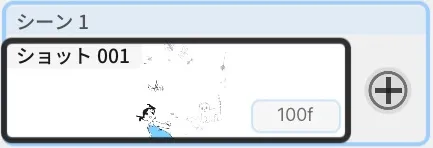
Location: Storyboard Timeline → Length display for the target shot
Basic steps
Section titled “Basic steps”- Select a shot in the Storyboard Timeline.
- Drag an edge of the shot or open Edit Shot Length.
- Set In, Out, and Lock Shot Length to Animation as needed.
Main options
Section titled “Main options”| Option | What it does |
|---|---|
| Edit Shot Length | Edits the shot duration numerically |
| Trim Ends | Adjusts the part that plays without changing the internal Drawing Timeline |
| Set In/Out | Sets the starting and ending playback frames |
| Lock Shot Length to Animation | Matches the shot duration to the internal animation length |
| Show Shot Length in Seconds / Show Shot Length as Seconds + Frames | Switches the duration display format |
| New Shot Length | Sets the initial duration of a shot created with Add Shot |
Drag the body of a shot to reorder it. Drag its left or right edge to adjust its In, Out, or duration. Drag the boundary between adjacent shots to perform a Roll edit. While locked, the message “Shot length is locked to the animation length” appears and the edges cannot be changed.
Lock In and Out
Section titled “Lock In and Out”The toolbar at the bottom of the Storyboard Timeline has buttons for linking and locking In and Out.
| Button | What it does |
|---|---|
| Link | Links In/Out to the content’s Start/End. Changing Start or End updates In/Out automatically. |
| Lock | Locks the shot’s In/Out and unlinks them from Start/End, so the shot length stays fixed. Pressing it again unlocks In/Out; the link stays off. |
If you try to change the shot range while it is locked, the message “Shot In/Out are locked. Unlock them to edit the shot range.” appears. The link is unavailable while locked, so unlock first and then link.
- In build 530, Caption Mode fixes the duration display to decimal seconds. Leaving Caption Mode restores the configured Seconds + Frames display.
Related articles
Section titled “Related articles”Verification
Section titled “Verification”- Hands-on verified: Checked and captured the displayed panel or menu in the installed app. The lower-right corner of the shot thumbnail shows its duration as 100f. The published image is a faithful crop of the source screenshot.
- Unverified: Verification covers only the interface shown in the image. All article procedures, effects of setting changes, exported file contents, saving/reopening and the Windows version were not reverified in this capture session.