
Add, delete, and split shots
Verification record: Umoupen 0.9.59 build 628 (2026-10-05) · Verification scope
The section being split is a shot. The playhead specifies where to split it.
Add shots to the Storyboard Timeline, remove shots you no longer need, or split a shot in two at the playhead.
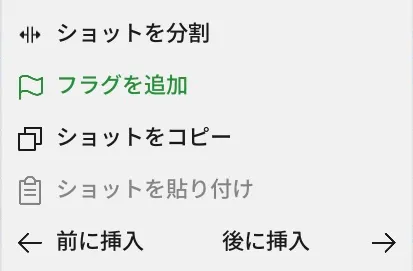
Location: Storyboard Timeline → Target shot
Shortcut (macOS): ⌘Y (Add Shot) / ⌘K (Split at Playhead)
Shortcut (Windows): Ctrl+Y (Add Shot) / Ctrl+K (Split at Playhead)
Basic steps
Section titled “Basic steps”- In the Storyboard Timeline, select the insertion point or target shot.
- Choose Add Shot, Insert Before, Insert After, or Split Shot.
- To remove a shot, confirm the target and choose Delete Shot.
Main options
Section titled “Main options”| Option | What it does |
|---|---|
| Add Shot | Adds a new shot |
| Insert Shot Before / After | Inserts a shot before or after the selected shot |
| Split Shot at Playhead | Splits the shot into two parts at the current position |
| Delete Shot | Deletes the selected shot |
| Copy Shot / Paste Shot | Copies the entire shot and pastes it at the specified position |
- Splitting divides a shot at the clicked frame or playhead and keeps both parts in their original positions.
- Delete Shot also removes all frames in that shot. When several shots are selected, the command is Delete Shots.
Related articles
Section titled “Related articles”Verification
Section titled “Verification”- Hands-on verified: Checked and captured the displayed panel or menu in the installed app. The shot context menu includes Split, Copy and insertion before or after a shot. The published image is a faithful crop of the source screenshot.
- Unverified: Verification covers only the interface shown in the image. All article procedures, effects of setting changes, exported file contents, saving/reopening and the Windows version were not reverified in this capture session.