
Stroke and fill colors
Verification record: Umoupen 0.9.59 build 628 (2026-10-05) · Verification scope
The stroke color is used for lines, and the fill color is used for areas. Primary and secondary colors are the two working colors you can switch between. RGB specifies colors with red, green, and blue components; HSV uses hue, saturation, and value. Use the Color panel to set colors and opacity.
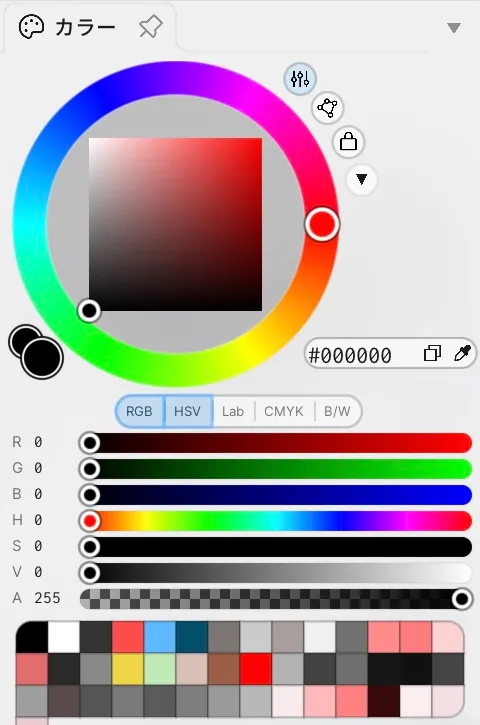
Choose the stroke color with the color wheel, a hex value, or sliders for each color model.
Location: Stroke and fill colors at the bottom of the left toolbar / Color panel
Shortcut: G (Toggle Fill / Shape Drawing) / S (Swap Drawing and Fill colors)
Basic use
Section titled “Basic use”- Open the color pair in the left toolbar or the Color panel.
- Choose whether to change the stroke or fill color, or the primary or secondary color.
- Set the color with HSV or RGB values and opacity.
Reading the Color panel
Section titled “Reading the Color panel”| Option | What it does |
|---|---|
| Color | Edits the current color with the color wheel and numeric values. |
| Palette | Switches to the list of saved colors. |
| Color Wheel | Lets you choose while viewing hue, saturation, and value. |
| RGB / HSV / Lab / CMYK / B/W | Shows or hides each slider group independently. Multiple groups can be visible at once. |
| Slider display | Shows or hides all sliders together and places them below or beside the color wheel. |
| Gamut Lock | Creates an editable gamut mask and restricts color selection to that range. |
| Luminosity Lock | Keeps the current CIELAB L* value while other color components change. |
| Hex Color | Specifies a color with a value such as #CD4141. |
| Recent Colors | Restores a recently used color from the bottom row. |
Main options
Section titled “Main options”| Option | What it does |
|---|---|
| Stroke | Selects the color used for lines. |
| Fill | Selects the color used for fills. |
| Color Pair | Shows and selects the current two colors together. |
| Primary / Secondary | Switches between the two working colors. |
| Swap Colors | Exchanges the two colors. |
| Custom Colors | Restores a saved color. |
| Eraser Mode | Switches from applying color to erasing. |
| RGB / HSV / Lab / CMYK / B/W | Independently displays sliders for RGB, hue/saturation/value, CIELAB, CMYK, and black-and-white values. |
| Opacity | Adjusts color opacity. |
| Recent Colors | Reuses a recent color. |
| Selected Vector Colors | Directly changes the colors of selected vectors. |
Working with colors
Section titled “Working with colors”| Action | Result |
|---|---|
| Drag the color wheel | Changes the hue. |
| Drag the inner triangle or square | Changes saturation and brightness. Use the control at the upper right to choose the inner shape. |
| Press RGB / HSV / Lab / CMYK / B/W | Shows or hides the selected slider groups independently. Selected groups appear one after another. |
| Toggle the slider display | Shows or hides all sliders together. |
| Change the slider position | Moves the sliders below or beside the color wheel. |
| Enable gamut lock | Restricts selection to the inside of the gamut mask. Drag its corners to edit the range. |
| Enable Luminosity Lock | Changes the color while preserving its current luminosity. |
| Switch between HSV and RGB | Changes the color representation used by the sliders. |
| Drag a slider | Continuously adjusts the selected component value. |
| Enter a hex color | Specifies a color with a value beginning with #. Use the adjacent copy button to copy it. |
| Press the Eyedropper | Samples a color from the screen. |
| Press a recent color | Restores it as the current color. |
Press a color swatch in the left toolbar to open a compact color pop-up containing the color wheel, numeric values, and Eyedropper.
Related articles
Section titled “Related articles”Verification
Section titled “Verification”- Hands-on verified: Opened the working copy and captured the Color panel with its color wheel, hex color field, color-model toggles, RGB, HSV and opacity values and sliders, and recent colors. Checked the text and controls in the article crop.
- Unverified: Results after changing color or opacity values, gamut and luminosity lock behavior, saving and reopening, and Windows were not verified.