
Double-page spreads, solo pages, and page margins
Verification record: Umoupen 0.9.59 build 628 (2026-10-05) · Verification scope
A double-page spread is a pair of facing pages. A solo view displays only the selected page. Margin guides mark the intended space between the page edges and the content.
Switch between single pages, double-page spreads, and solo views, and set margin guides for printing or layout.
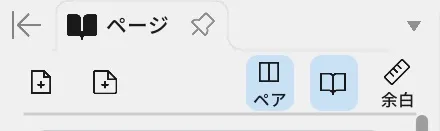
Location: Top of the Pages panel / File → Edit Page Margins / Left toolbar → Book Margins
Basic steps
Section titled “Basic steps”- Select the target page in the Pages panel.
- Choose Make Double-Page Spread, Make Single Page, or Make Solo Page.
- On a compatible Book page, open Edit Page Margins and adjust the guides.
On a compatible Book page, add Book Margins to the left toolbar to edit margin guides directly. If it is not visible in the current layout, use Search → Customize Toolbar to show it.
Main options
Section titled “Main options”| Option | What it does |
|---|---|
| Make Double-Page Spread | Treats two pages as one spread |
| Make Single Page | Returns to a single page |
| Make Solo Page | Shows only the target page |
| Pair Page | Pairs the page with another page |
| Edit Page Margins | Sets the Inside, Outside, Top, and Bottom guides |
Book Margins properties
Section titled “Book Margins properties”| Operation | What it does |
|---|---|
| Add Margins / Remove Margin | Adds a margin guide or removes the selected guide |
| Switch to Mirrored / Switch to One Sided | Links the left and right sides or edits each side separately |
| Left / Right / Left/Right Mirrored | Selects a horizontal margin |
| Top / Bottom / Top/Bottom Mirrored | Selects a vertical margin |
| Exit Margin Edit | Ends margin editing |
Related articles
Section titled “Related articles”Verification
Section titled “Verification”- Hands-on verified: Checked and captured the displayed panel or menu in the installed app. The upper Pages panel contains Pair and Book display buttons. The published image is a faithful crop of the source screenshot.
- Unverified: Verification covers only the interface shown in the image. All article procedures, effects of setting changes, exported file contents, saving/reopening and the Windows version were not reverified in this capture session.