
Draw shapes
Verification record: Umoupen 0.9.59 build 628 (2026-10-05) · Verification scope
Place precise lines, rectangles, and ellipses.
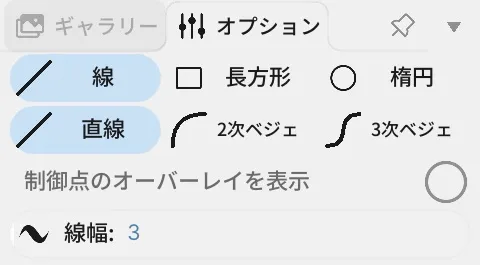
Location: Left toolbar → Shape / Options on the right
Shortcut: U
Basic use
Section titled “Basic use”- Select Shape.
- Choose the shape type and Line, Fill, or Both in Options.
- Drag on the Stage to set its size.
Draw straight and Bezier lines
Section titled “Draw straight and Bezier lines”A Bézier curve is a curve whose bend is set with control points. A control point determines the bend rather than the start or end of the line. Choose Straight, Quadratic, or Cubic for a line.
- Straight: Drag between the endpoints, or click the start and end points in order.
- Quadratic: Place both endpoints, then click one control point.
- Cubic: Place both endpoints, then click the start-side and end-side control points in order.
Quadratic and Cubic modes preview the line under the pointer. Press Esc to cancel placement.
Options panel controls
Section titled “Options panel controls”| Option | What it changes |
|---|---|
| Line / Rectangle / Ellipse | Chooses a straight line, rectangle, or ellipse. |
| Straight / Quadratic / Cubic | Chooses a straight line, one control point, or two control points. |
| Line / Fill / Both | Draws only the line, only the fill, or both. |
| Line Width | Outline width. |
| Opacity | Shape opacity. |
| Round Caps / Flat Caps | Makes line ends round or flat. |
| Over Lines / Under Lines / Inside Fills / Behind Fills | Chooses placement relative to existing lines and fills on a vector layer. |
Related articles
Section titled “Related articles”Verification
Section titled “Verification”- Hands-on verified: Checked and captured the displayed panel or menu in the installed app. Shape Options offer Line, Rectangle, Ellipse, straight or Bézier lines and line width. The published image is a faithful crop of the source screenshot.
- Unverified: Verification covers only the interface shown in the image. All article procedures, effects of setting changes, exported file contents, saving/reopening and the Windows version were not reverified in this capture session.