
Manage Palettes
Verification record: Umoupen 0.9.59 build 628 (2026-10-05) · Verification scope
A palette is a collection of reusable color samples. Each sample is called a swatch. Save frequently used colors and organize palettes into folders. Palette linking also lets changes to a swatch update vector strokes and fills.
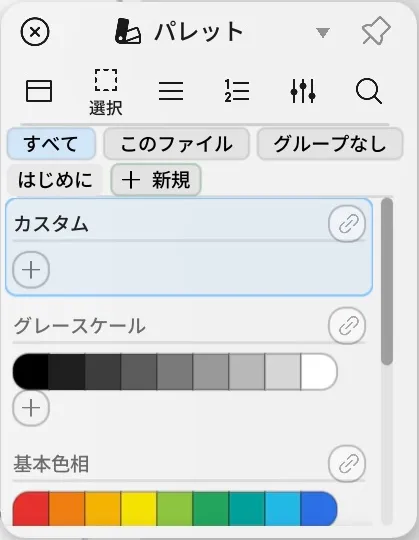
Location: Panels → Show Panels → Palette
Shortcut (macOS): ⌥1–⌥9 (Palette Color)
Shortcut (Windows): Alt+1–Alt+9 (Palette Color)
Add the current color to a palette
Section titled “Add the current color to a palette”- Open Panels → Show Panels → Palette.
- Create or select a folder and palette.
- Use the plus button at the end to add the current color.
To add colors to a read-only palette, right-click it and choose Duplicate as Editable Palette, then use the copy.
Change colors across the file later
Section titled “Change colors across the file later”Enabling linking on a palette ties the vector strokes and fills you draw with its colors to the swatch itself. Editing the swatch later updates everywhere that color was used.
- Add a palette to the file.
- Enable linking on that palette.
- Pick a color from it and draw.
- Right-click the swatch and change its color. The linked artwork changes with it.
A gradient is a fill whose color changes continuously across an area. A gradient stop specifies a color at a particular position in that transition.
Vector strokes, fills, and gradient stops drawn with that color after linking was enabled follow the color change. Raster pixels stay unchanged.
Display and import formats
Section titled “Display and import formats”| Option | What it does |
|---|---|
| List / Grid / Select | Changes the view or selects several items |
| All / Ungrouped / This File | Filters palettes by storage location |
| Sort | Organizes palettes by name, color count, or reverse order |
| Options | Creates, imports, exports, or moves a palette to another storage location |
| .umopalette | Keeps identifying information for a name, folder, and color swatches |
| .umopalettepack | Contains a complete palette folder |
| GPL / ASE / ACO / ACT / PAL / CLS | Supported import formats |
| Image Import | Creates a palette from the main colors in an image |
What the menus offer
Section titled “What the menus offer”Right-click a palette, a folder, or a swatch and the menu shows the items that apply to it.
| Item | What it does |
|---|---|
| New Palette / New Palette Here / New Folder | Creates palettes and folders. New Palette Here creates it inside the selected folder. |
| Duplicate / Duplicate as Editable Palette | Duplicates a palette. Use the second one to get an editable copy of a read-only palette. |
| Move to This File / Remove from This File | Brings a palette into the open file, or takes it out again. Linked colors need a This File palette. |
| Sort Colors | Orders the swatches By Hue, By Brightness, By Name, or Reverse. |
| Remove Duplicates | Collapses swatches that hold the same color. |
| Delete Color / Delete Palettes / Delete Folder | Deletes the selected swatch, palette, or folder. |
| Export / Upload to Market | Exports the selected palette to a file, or submits it to the Market. |
| Publish to Studio Library | Publishes an editable palette as a read-only Studio palette; everyone receives it after sync. Requires a Studio seat. |
Drag titles or folders to reorder them.
The panel’s own Sort (By Name, By Color Count, Reverse) orders the list of palettes; Sort Colors orders the swatches inside one palette.
- To move the complete structure to another Mac, use
.umopaletteor.umopalettepack.
Related articles
Section titled “Related articles”Verification
Section titled “Verification”- Hands-on verified: Checked and captured the displayed panel or menu in the installed app. The Palettes panel shows Custom, Grayscale and Basic Hues, with New and add-color controls. The published image is a faithful crop of the source screenshot.
- Unverified: Verification covers only the interface shown in the image. All article procedures, effects of setting changes, exported file contents, saving/reopening and the Windows version were not reverified in this capture session.