
Create a layer and choose its type
Verification record: Umoupen 0.9.60 build 632 (2026-10-07) · Verification scope
Create a new layer suited to the work you want to do. See The Layers panel and active layer for layers and the editing destination, and Raster and Vector for the drawing formats.
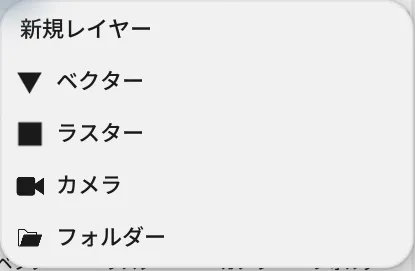
The menu in build 628. Build 632 also lists Panorama.
Location: Plus button at the bottom of the Timeline
Shortcut (macOS): ⇧⌘N (New Layer)
Shortcut (Windows): Ctrl+Shift+N (New Layer)
Basic use
Section titled “Basic use”- Click the plus button at the bottom of the Timeline to open New Layer.
- Choose a layer type.
- Confirm that the new layer is now the active layer.
Main options
Section titled “Main options”| Option | What it does |
|---|---|
| Vector | Draws with editable lines and fills. |
| Raster | Draws with pixels. |
| Panorama | Adds a panorama layer. Drawing and viewpoint controls were not verified in this session. |
| Camera | Holds the framing and the camera animation. |
| Folder | Groups layers and keeps their timing together. |
These five types appeared in the project animation in build 632. Nested folders and timing sync are covered in Folders and parenting.
When Camera is missing from the list
Section titled “When Camera is missing from the list”In a book file, you can add a camera only while the open page has its animation turned on. Turn the page animation on, then open the list again. In every other file format, Camera is always in the list.
Types that are not in this list
Section titled “Types that are not in this list”| What you want | How to create it |
|---|---|
| Clipping (mask) | There is no mask layer type. Right-click the layer you want to clip and choose Clip to Layer Below, and it is clipped to the shape on the layer underneath. Masks and clipping masks |
| Reference image | Load an image with Add Reference Images in the Reference panel. Images and reference images |
| Audio layer | Created when you load an audio file into the Timeline. Audio Layers and Audio Tracks |
| Video layer | Created when you load a video file. Video Layer |
Related articles
Section titled “Related articles”Verification
Section titled “Verification”- Hands-on verified: On a working copy of Weilin, the Timeline plus button listed Vector, Raster, Panorama, Camera and Folder. Adding Vector, Raster and Panorama made each new layer active.
- Unverified: Panorama drawing and viewpoint controls, adding Camera or Folder, book-specific conditions, saving/reopening and Windows were not verified. The existing image shows build 628.