
Help and Tips
Verification record: Umoupen 0.9.59 build 628 (2026-10-05) · Verification scope
A tooltip is a short explanation shown when the pointer rests over a button or icon. It serves a different purpose from procedural Help or the key-assignment list.
Use the in-app Help, Tips, and Tooltips to check feature names and basic operations while you work.
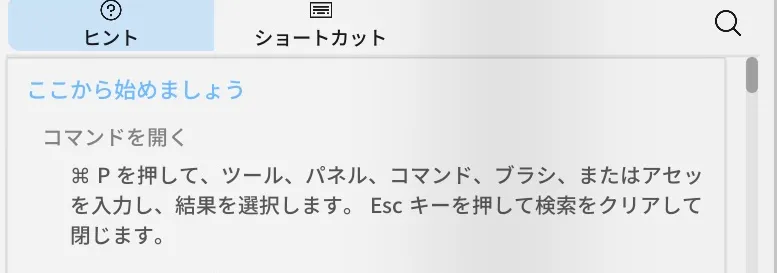
Location: Panels → Show Panels → Help
Basic steps
Section titled “Basic steps”- Open Help from Panels.
- Search for a feature name or task.
- To find a key, use Shortcuts in Help or Edit Keybinds.
- Turn on Tooltips to see short explanations of buttons.
Which source to use
Section titled “Which source to use”| Source | Best for |
|---|---|
| Help | Workflows, panels, tools, import, and export |
| Tips | Short guidance while working |
| Tooltips | Names of buttons and icons |
| Shortcuts | Keys assigned to commands |
At the top of the Help panel, you can switch between the user guide, shortcuts, and settings guidance. The Shortcuts view lets you search, change assignments, review conflicts, reset defaults, and import presets.
If you cannot find something
Section titled “If you cannot find something”- Search for its English UI name or command name.
- Search can sometimes open the feature directly.
Related articles
Section titled “Related articles”Verification
Section titled “Verification”- Hands-on verified: Checked and captured the displayed panel or menu in the installed app. The Hints tab in Help explains how to open Search and find tools or commands. The published image is a faithful crop of the source screenshot.
- Unverified: Verification covers only the interface shown in the image. All article procedures, effects of setting changes, exported file contents, saving/reopening and the Windows version were not reverified in this capture session.