
Add, duplicate, delete, and reorder pages
Verification record: Umoupen 0.9.59 build 628 (2026-10-05) · Verification scope
Edit the contents and order of pages. Displaying facing pages as a spread is covered separately.
Add or remove pages, duplicate their contents, and drag thumbnails to reorder them.
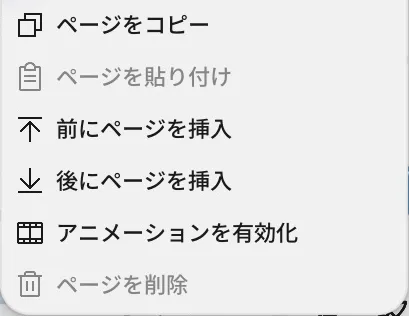
Location: Pages panel → Target page
Basic steps
Section titled “Basic steps”- Select the target page in the Pages panel and right-click it.
- Choose Cut, Copy, Paste, Insert Before, Insert After, or Delete.
- To change the order, drag the thumbnail to the insertion point.
Main options
Section titled “Main options”| Option | What it does |
|---|---|
| Single Page / Double-Page Spread | Adds a new page from the top of the panel. |
| Insert Page Before / Insert Page After | Inserts a new page before or after the selected page. |
| Copy Page / Paste Page | Duplicates the copied page. |
| Cut Page / Paste Page | Moves a page to another position. |
| Delete Page | Removes the selected page. |
| Reorder Pages | Drag a page to move it to the insertion point. Spreads and pairs stay together. |
Related articles
Section titled “Related articles”Verification
Section titled “Verification”- Hands-on verified: Checked and captured the displayed panel or menu in the installed app. The page context menu includes Copy, insertion before/after and Enable Animation. The published image is a faithful crop of the source screenshot.
- Unverified: Verification covers only the interface shown in the image. All article procedures, effects of setting changes, exported file contents, saving/reopening and the Windows version were not reverified in this capture session.