
Multi-Frame Edit
Verification record: Umoupen 0.9.49 build 530 (2026-08-23) · Verification scope
Multi-Frame Edit is a mode for moving or transforming drawings at several times together. Blue markers on the Timeline define the editing range. The distinction between frames and drawing cels matters when counting that range.
Location: Timeline (Panels → Show Panels → Timeline)
Shortcut (macOS): ⇧M
Shortcut (Windows): Shift+M
Toggle Multi-Frame Edit
Section titled “Toggle Multi-Frame Edit”Press ⇧M to turn the mode on or off. You can also use the Multi-Frame Edit button at the bottom of the Timeline.
To change how the range is counted, press ⌘P, search for multi, and run toggle multi-frame ABS/CEL mode.
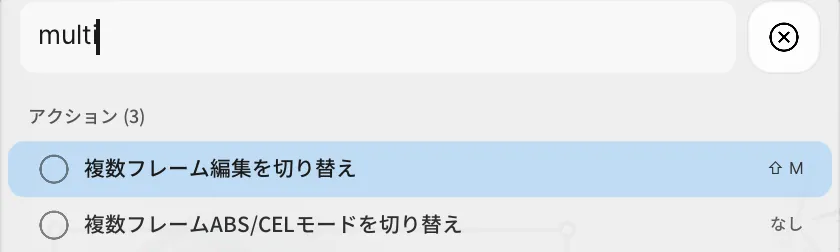
How ABS, CEL, and KEY count the range
Section titled “How ABS, CEL, and KEY count the range”| Status | How selection markers are counted |
|---|---|
| ABS | Counts frames on the Timeline. |
| CEL | Counts drawing cels. A drawing held across several frames counts as one cel. |
| KEY | Counts drawing cels and tween keys. |
In the build 639 screen checked for this article, the command name uses ABS/CEL, while the enabled status shows ABS or KEY.
When a drawing is held for several frames, the same setting can cover a different range. In the project example, layer A is at frame 29 with one item on each side. ABS markers cover frames 28–30, while KEY markers enclose the three drawings starting at frames 26, 29, and 32.
Edit multiple drawings
Section titled “Edit multiple drawings”- Choose the layer to edit and the frame at the center of the range.
- Press ⇧M to enable Multi-Frame Edit.
- Choose how to count the range, then check the blue Timeline markers and the drawings displayed together on the canvas.
- Select the drawings to move or transform, then perform the edit.
- Turn off Multi-Frame Edit and inspect the result on each frame.
Move three drawings together
Section titled “Move three drawings together”This example selects the three drawings at frames 26, 29, and 32 on layer A and moves them up and left. Multi-Frame Edit is then turned off to show each drawing in sequence.
If the range is not what you intended
Section titled “If the range is not what you intended”| Symptom | What to check |
|---|---|
| Only the current drawing is included | Enable Multi-Frame Edit and check that the blue markers include adjacent drawings. |
| One item on each side does not include the expected number of drawings | ABS counts frames. Switch the counting mode to specify the range by drawings. |
| The range differs where tween keys are present | KEY counts tween keys as well as drawing cels. Check the marker positions. |
Related articles
Section titled “Related articles”Verification
Section titled “Verification”- Verified from the current implementation: Verified Multi-Frame Edit, ABS and CEL switching, and marker counting by frame or cel in the current implementation.
- Unverified: Transform results for Raster, Vector, and Symbol content in build 530, and the Windows version, were not verified.
- Evidence records: F-20260822-011, F-20260823-001