
Storyboard panel and shot thumbnails
Verification record: Umoupen 0.9.59 build 628 (2026-10-05) · Verification scope
A thumbnail is a reduced image used to browse content. This panel arranges thumbnails for individual shots.
Use this panel to survey shots as images and check their order and continuity.
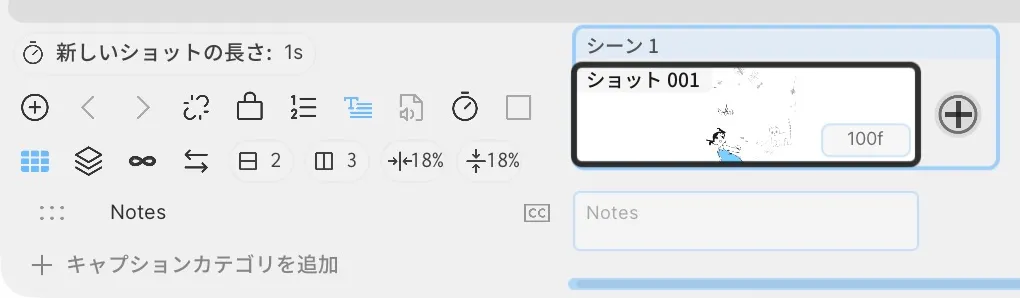
This example has no Camera Layer, so CAM is not shown.
Location: Storyboard Timeline → Shot Thumbnail Grid
Shortcut (macOS): ⇧⌘Y (Toggle Cut Grid)
Shortcut (Windows): Ctrl+Shift+Y (Toggle Cut Grid)
Basic steps
Section titled “Basic steps”- Show the Storyboard Timeline.
- Use the Shot Thumbnail Grid button on its left, or
⇧⌘Y, to switch to the grid. - Select a thumbnail to move to that shot.
The page-style view opened with Layout → Storyboard is a separate view.
Main items
Section titled “Main items”| Item | What it does |
|---|---|
| Thumbnail Grid | Shows shots as a grid of images |
| Rows / Columns | Sets the number of grid rows and columns |
| Shot Grid Order | Sets the reading direction (Rows Left to Right / Columns Top to Bottom) |
| H / V Padding | Sets the spacing between thumbnails |
| Fit Shot Grid | Fits the grid within the panel |
| All / Lines / Fills | Changes the contents shown in thumbnails |
| CAM | Shows the camera frame and camera-motion path |
Click a thumbnail to move to that shot. The panel’s zoom and scroll position are for reviewing the grid and are separate from the Stage zoom of the shot itself.
CAM toggle
Section titled “CAM toggle”A pink CAM toggle appears in the thumbnail for any shot that has a Camera Layer.
Click CAM to show the camera frame and motion path over the thumbnail. Click it again to hide them.
Use it to review the range of camera motion without leaving the shot grid.
Related articles
Section titled “Related articles”Verification
Section titled “Verification”- Hands-on verified: Checked the displayed interface in installed build 628 and published a faithful crop. This Cut Grid example shows Shot 001 in Scene 1 with row, column and padding controls. This sample has no camera layer, so CAM is absent.
- Unverified: Verification is limited to the captured interface and the actions described above. All article procedures, setting effects, output files, saving/reopening and Windows behavior were not reverified.