
Brush presets and groups
Verification record: Umoupen 0.9.60 build 632 (2026-10-07) · Verification scope
A brush preset stores settings that determine the tip and drawing behavior. The brush tip is the shape used to make the stroke. Organize several presets into groups to reuse drawing settings.
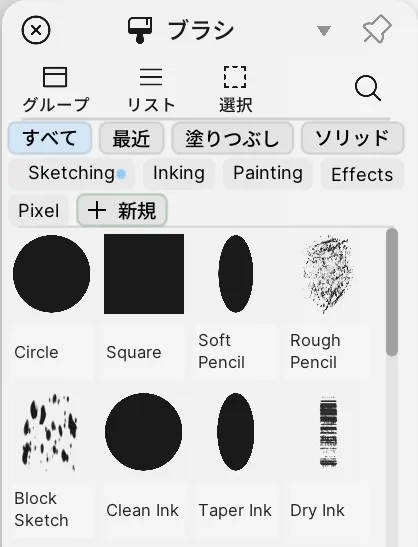
The Brushes panel in build 628. Build 632 changes its categories and group positioning controls.
Location: Panels → Show Panels → Brushes
Basic steps
Section titled “Basic steps”- In the Brushes panel, choose All, Recent, Fill, or Solid to set the visible range.
- Select a brush and adjust its size, pressure, texture, and other settings in Properties.
- Right-click and choose Save as New Brush to save the adjusted settings as a separate brush.
Main options
Section titled “Main options”| Option | What it does |
|---|---|
| List / Grid | Switches between a list with brush names and a view focused on brush tips |
| Selection Mode | Selects several brushes together |
| New / New Group | Creates a brush or an organizing group |
| All / Recent / Fill / Solid | Filters the brushes shown |
| Groups | Moves the group list between the side and the top |
| Scale | Changes the display size of brushes in the list |
Use the Groups button to place the group list at the side or at the top. The Solid group contains Solid Round, Solid Flat and Solid Hairline. In build 632, drawing on raster and vector layers was verified while keeping the 1px brush size.
Right-click operations
Section titled “Right-click operations”| Item | What it does |
|---|---|
| Save as New Brush | Saves the current settings as a separate brush. |
| Save Default | Makes the current settings the brush’s own default. |
| Reset Brush | Returns the brush to its stored default. |
| Apply Brush to Strokes | Redraws the selected strokes with this brush. |
| Edit Tip | Edits the brush tip image. |
| Duplicate / Rename / Delete | Duplicates, renames, or deletes a brush. With several selected it becomes Delete Selected Brushes. |
| New Group… / New Group with Selected Brushes | Creates a group for organizing brushes; the second one starts with the selected brushes inside. |
| Rename Group / Delete Group | Renames or deletes a group. |
| Export / Upload to Market | Exports brushes or groups to files, or submits them to the Market. |
Dual brush settings (size, angle, roundness, scatter, softness, follow direction) are in the brush properties, not in this menu.
Drag brushes or groups to reorder them. Drop a brush onto a group to categorize it. Drag a brush outside the panel to export a .umob, or a group to export a .umobp. Drop either format onto the panel to import it.
Related articles
Section titled “Related articles”Verification
Section titled “Verification”- Hands-on verified: On a working copy of Weilin, verified the side/top group toggle, All, Recent, Fill and Solid categories, and Solid Round, Solid Flat and Solid Hairline. Lines could be drawn on newly added raster and vector layers while keeping the 1px brush setting.
- Unverified: Individual brush appearance, antialiasing, vector-specific settings, preset saving, import/export, saving/reopening and Windows were not verified. The existing image shows build 628.