
Folders and parenting
Verification record: Umoupen 0.9.59 build 628 (2026-10-05) · Verification scope
A folder is a layer for grouping related layers. Layers inside it are its children, and the containing folder is their parent in the hierarchy. This organizational parent differs from a transform parent, which makes one layer follow another layer’s transform.
Location: Layers panel → Folder / layer hierarchy / Right-click a layer → Transform Parent
Basic use
Section titled “Basic use”- Create a new folder.
- Drag the target layers into that folder.
- Expand the folder and check its child layers.
Main options
Section titled “Main options”| Option | What it does |
|---|---|
| Folder | Organizes child layers. |
| Expand / Collapse | Shows or hides child layers. |
| New Folder Frames | Creates a frame for folder timing. |
| Sync Layer Timing | Synchronizes frame placement on direct child layers. |
A layer’s parent in the hierarchy is the folder that contains it. To change that parent, move the layer into another folder.
See Sync layer timing in a folder for the conditions and warnings that apply to timing synchronization.
Make a layer follow another layer
Section titled “Make a layer follow another layer”See Transform parent for assigning a layer to follow without changing folder hierarchy, scaling with the parent, and clearing the relationship.
Related articles
Section titled “Related articles”Verification
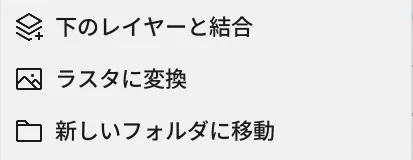
Section titled “Verification”- Hands-on verified: Checked and captured the displayed panel or menu in the installed app. Move to New Folder appears below the merge and raster conversion commands. The published image is a faithful crop of the source screenshot.
- Unverified: Verification covers only the interface shown in the image. All article procedures, effects of setting changes, exported file contents, saving/reopening and the Windows version were not reverified in this capture session.