
Shortcuts and keybind presets
Verification record: Umoupen 0.9.62 build 660 (2026-10-21) · Verification scope
A keybind maps a key combination to a command; a keyboard shortcut uses that combination to invoke the operation. A preset is a named set of assignments or settings that can be selected again.
Assign keys to frequently used commands and save the assignments as presets for different workflows.
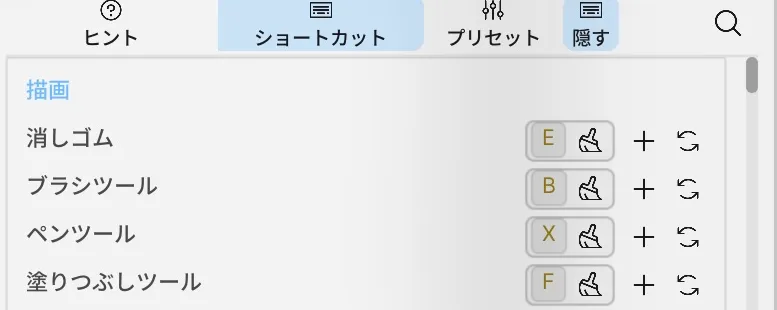
Location: Settings (gear) → More → Edit Keybinds / Help → Shortcuts / Help → Presets
Change a key
Section titled “Change a key”- Open Edit Keybinds.
- Find the command under Shortcuts.
- Click its shortcut row and press the new key combination.
- Review any conflicts, then save the assignment.
Binding several tools to the same key cycles through them each time you press it. The keybind screen lists them under Cycles with:.
To toggle transparency locking on a Raster Layer from the keyboard, find Lock Transparency in the command list and assign a key. Check the conflict indicator if the current preset uses the same key for a brush command.
Presets and transfer
Section titled “Presets and transfer”| Option | What it does |
|---|---|
| New Preset | Creates a preset from the current assignments. |
| Save Preset as | Saves the assignments as a differently named preset. |
| Update Preset with current keybind changes | Updates the current preset. |
| Delete Shortcut Preset | Deletes the selected user preset. |
| Umoupen Default | Switches to the initial assignments in build 530. |
| Clip Studio Paint / Flash / Animate / TVPaint | Built-in presets. Choosing one replaces the keys of commands in the Shortcuts list with assignments close to that app. |
| Export Keybinds | Exports assignments to a file. |
| Import Keybinds | Imports an assignment file. |
Choose a preset under Presets in Help. The four built-in presets are Umoupen Default, Clip Studio Paint, Flash / Animate, and TVPaint. For example, Flash / Animate assigns frame commands such as F5 to F8 close to Adobe Animate. Switching presets does not add commands that are not in the list.
Actions added in 0.9.51
Section titled “Actions added in 0.9.51”| Name in Shortcuts | Default macOS key | What it does |
|---|---|---|
| Decrease Brush Opacity | ; | Decreases brush opacity |
| Increase Brush Opacity | ' | Increases brush opacity |
| Decrease Brush Flow | Shift+; | Decreases brush flow |
| Increase Brush Flow | Shift+' | Increases brush flow |
| Merge Selected Layers Or Merge Down | None | Merges selected layers when several are selected, or merges the selected layer with the corresponding layer below when only one is selected |
These five actions are available in Edit Keybinds in build 541. They appear with these English names because no built-in localized equivalents are registered. Layer merging has no default key, so assign the key you want to use.
- Keys shown in this guide are the initial
Umoupen Defaultassignments in build 530. If you changed them, search by command name. Cmdon macOS is shown asCtrlon Windows.- The macOS and Windows lists are collected under Browse by shortcut.
- The command used by a key may change with the current context, such as drawing, the Timeline, or panels.
- Build 530 contains 246 default registration points, or 261 entries after expanding repeated Camera Preset and Palette Color registrations. Unassigned and development commands are separated from the public list, and user-facing assignments are organized by context.
- Export your keybinds before changing them so that you can restore the previous assignments easily.
Related articles
Section titled “Related articles”Verification
Section titled “Verification”- Verified from the current implementation: Confirmed in the build executable's strings that the built-in presets Umoupen Default, Clip Studio Paint, Flash / Animate, and TVPaint are listed together, and confirmed the preset labels in the built-in translations.
- Note: Choosing presets under Presets in Help, that switching only replaces keys of commands in the list, and the F5 to F8 assignments in Flash / Animate are taken from a build 596 record of the user's screen and settings file.
- Unverified: The location of presets on screen in this build, each preset's assignments in this build, the Clip Studio Paint and TVPaint assignments, and the Windows version were not verified.
- Evidence records: F-20260919-002