
Pan, zoom, and rotate the Stage
Verification record: Umoupen 0.9.59 build 628 (2026-10-05) · Verification scope
The Stage is the work area where artwork and assets are displayed and edited. Panning moves the view; zooming changes its display scale. These operations adjust the view without changing artwork. They serve a different purpose from setting a camera to define the framing.
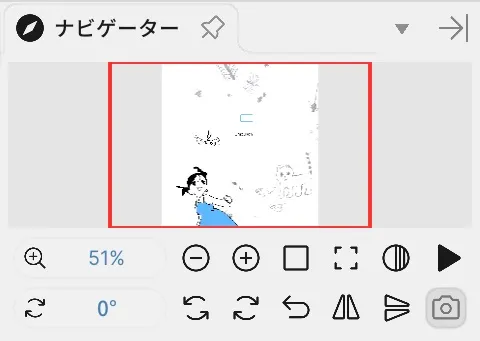
Location: On the Stage (Space, Zoom, and Rotate)
Shortcut (macOS): Space (Pan) / ⇧Space (Zoom) / ⌥Space / ⇧A / ⇧D (Rotate)
Shortcut (Windows): Space (Pan) / Shift+Space (Zoom) / Alt+Space / Shift+A / Shift+D (Rotate)
Basic steps
Section titled “Basic steps”- Hold Space and drag to pan.
- Use the mouse wheel or Zoom In / Out to zoom.
- Hold
Alt+Spaceand drag left or right, or use Rotate Left / Right.
Main options
Section titled “Main options”| Option | What it does |
|---|---|
| Pan | Moves the view |
| Zoom | Changes the view scale |
| rotate canvas left / rotate canvas right | Changes the view angle |
| Fit to Window | Fits the whole Stage within the panel |
| Actual Size | Displays at the equivalent of 100% |
| Fit Width | Fits the width to the window |
| Reset Rotation | Returns the view rotation to 0 |
| Flip Horizontal | Flips only the view horizontally |
| Flip Vertical | Flips only the view vertically |
Related articles
Section titled “Related articles”Verification
Section titled “Verification”- Hands-on verified: Checked and captured the displayed panel or menu in the installed app. The lower Navigator area groups zoom, rotation, flip and other view controls. The published image is a faithful crop of the source screenshot.
- Unverified: Verification covers only the interface shown in the image. All article procedures, effects of setting changes, exported file contents, saving/reopening and the Windows version were not reverified in this capture session.