
Draw with the Pen
Verification record: Umoupen 0.9.59 build 628 (2026-10-05) · Verification scope
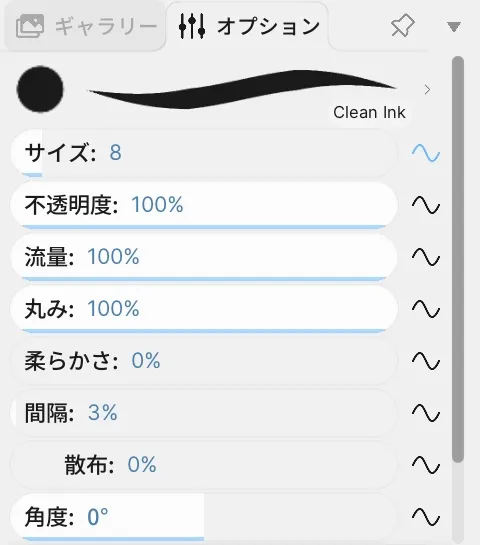
Draw crisp, ink-like lines. On raster layers, Pen also paints pixels through brush presets. On vector layers, its controls switch to line, fill, and placement settings.
See Raster and vector layers for the drawing formats, and Brush for strokes and presets.
Location: Left toolbar → Pen / Options on the right
Shortcut: X
Basic use
Section titled “Basic use”- Select Pen.
- Set the line width, opacity, and smoothing for the active layer.
- Drag on the Stage to draw.
Infinite canvas: The current Stage viewport is not the edge of the drawing area. Pan to another area to keep drawing beyond the current view.
Options panel controls
Section titled “Options panel controls”The available options change depending on whether the active layer is raster or vector.
| Layer | Option | What it changes |
|---|---|---|
| Raster | Size / Opacity / Flow | Line width, opacity, and amount of paint. |
| Raster | Roundness / Softness / Spacing / Angle | Pen-tip shape, hardness, mark spacing, and direction. |
| Raster | Stabilizer / Smoothing / Dynamics | Input correction and changes driven by pressure or other input. |
| Vector | Line / Fill / Both | Whether the tool draws a line, a fill, or both. |
| Vector | Size / Opacity / Smoothing | Line width, opacity, and line smoothness. |
| Vector | Round / Square, Round Caps / Flat Caps | Pen-tip and line-end shapes. |
| Vector | Follow Direction | Turns the pen tip toward the direction of the stroke. |
| Vector | Over Lines / Under Lines / Inside Fills / Behind Fills | Placement relative to existing lines and fills. |
| Both | Custom Pen Tip / Open Brush Panel | Uses a custom pen tip / opens Brushes. |
Related articles
Section titled “Related articles”Verification
Section titled “Verification”- Hands-on verified: Checked and captured the displayed panel or menu in the installed app. This Pen example shows the Clean Ink preview, size, opacity, flow and related controls. The published image is a faithful crop of the source screenshot.
- Unverified: Verification covers only the interface shown in the image. All article procedures, effects of setting changes, exported file contents, saving/reopening and the Windows version were not reverified in this capture session.