
Multiplane and depth
Verification record: Umoupen 0.9.61 build 649 (2026-10-15) · Verification scope
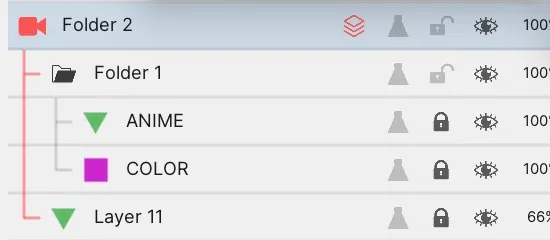
Multiplane places artwork on several planes at different depths. A depth plane is a plane of artwork assigned a depth position. Parallax occurs when artwork at different depths moves by different amounts with the camera, changing its relative positions. Treat artwork inside a Camera Folder as depth planes and vary how far each plane moves with the camera. Placing foreground and background artwork at different depths adds parallax to a pan. Use Scale to Depth for push-ins and pull-backs driven by camera Z movement.
Location: Right-click a Camera Folder → Multiplane Parallax / Scale to Depth / Edit Depths
Divide artwork into depth planes
Section titled “Divide artwork into depth planes”- Put artwork that should move separately, such as foreground and background elements, on separate layers.
- Put them in the same Camera Folder.
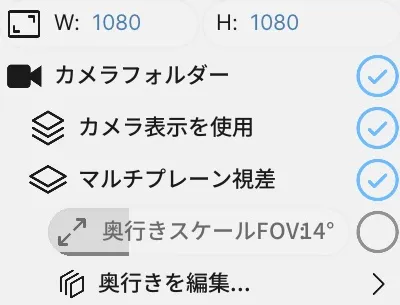
- Right-click the Camera Folder and enable Use Camera View and Multiplane Parallax.
- Use Edit Depths to adjust the camera and artwork depths.
The built-in description treats each direct child layer or folder as one depth plane. Its descendants inherit that depth. To move line art and colors together on one plane, put them in the same child folder.
Edit Depths shows the camera and artwork planes in depth. The example places the character folder and background layer at different depths.
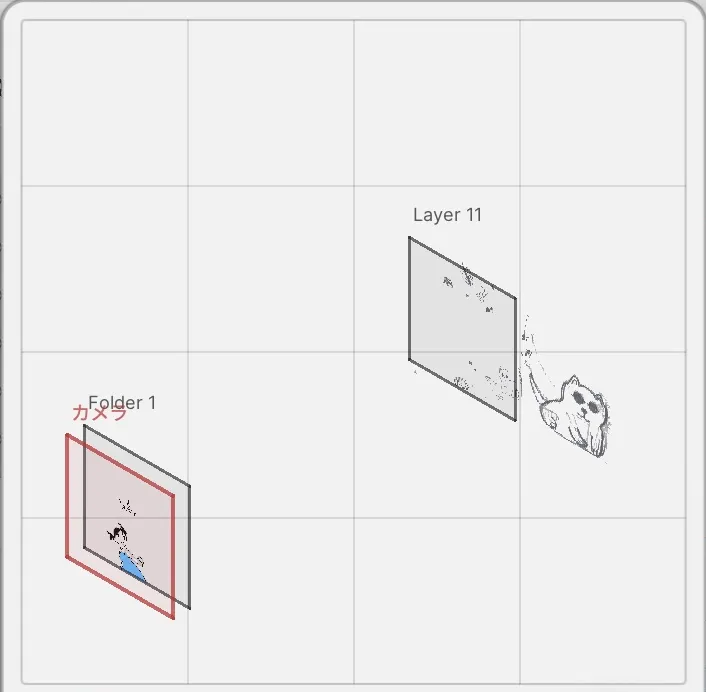
Adjust depth by dragging a depth line at the bottom of the editor. The diagram above shows the resulting plane positions.
Add parallax to a pan
Section titled “Add parallax to a pan”- Create a starting camera key and set its position.
- Create an ending key at a later frame and change X or Y.
- Check the interval with Play From Camera or the Camera Folder’s camera view.
Far planes move less than near planes, changing the artwork’s relative positions. Start with a horizontal move and compare the foreground and background displacement. See Camera Layer for basic camera key operations.
The example holds the character and background drawings still, with camera keys at frames 1 and 48. Drag the camera to the right at frame 48 to set the horizontal move.
This is the resulting interval played repeatedly in camera view. As the camera moves right, the near character moves farther left than the distant cat and mouse. Their spacing changes continuously, showing the parallax.
Use Z movement for a push-in or pull-back
Section titled “Use Z movement for a push-in or pull-back”X and Y move the camera horizontally and vertically. Z moves it in depth. Enabling Scale to Depth also applies Z movement to the artwork’s apparent size.
- Enable Multiplane Parallax and Scale to Depth.
- Use the Move tool to select the camera on the Stage.
- Change camera Z and check that the artwork changes size.
- Set different Z values at the starting and ending keys, then play the interval.
- Enable Use Camera in the export settings as well when exporting.
With one raster layer in build 630, Z-driven enlargement and continuous playback between keys over 48 frames were verified. In the comparison with Scale to Depth disabled, changing only Z while X and Y remained at zero did not produce the same enlargement.
Main options
Section titled “Main options”| Option | What it does |
|---|---|
| Multiplane Parallax | Applies different amounts of camera X/Y displacement to different depth planes |
| Scale to Depth | Also applies the depth-dependent scale to artwork size |
| Edit Depths | Adjusts camera and plane depths |
| Depth Plane | Treats artwork as a plane in depth |
| Z | The camera’s depth position, which can vary between keys |
| Use Camera View | Displays the Camera Folder contents through its camera |
If movement is invisible or enlargement stops
Section titled “If movement is invisible or enlargement stops”| Situation | What to check |
|---|---|
| Foreground and background move alike | Check whether they are inside the same direct child folder and whether they occupy different depth planes. |
| Moving only Z does not show a push-in or pull-back | Enable Multiplane Parallax and Scale to Depth. |
| Artwork in the folder does not respond to the camera | Check that the target layers are inside the Camera Folder and Use Camera View is enabled. |
| Camera movement is missing from the export | Check Use Camera in the export settings. |
| Moving the camera closer no longer enlarges the artwork | In the single raster plane comparison in build 630, enlargement reached a limit and the artwork remained visible as Z increased further. Adjust artwork visibility separately when planning a move past a plane. |
A built-in message states that reparenting a layer clears its depth tween keys. Decide the folder structure before adding depth keys.
Related articles
Section titled “Related articles”Verification
Section titled “Verification”- Hands-on verified: Verified two depth planes in a Camera Folder, with character and background drawings held still. Recorded dragging the camera right at frame 48 and playback between camera keys at frames 1 and 48: the character moves farther left than the background cat and mouse.
- Unverified: Y movement, Z movement and Scale to Depth in build 649, moving a whole depth block, export, saving/reopening, and Windows were not tested. The single-plane Z comparison in build 630 remains a separate historical record.
- Evidence records: F-20261017-008